We act as your clinic's billing agent: claims submitted, remittances reconciled, rejections chased
and resubmitted, and the codes you're missing found. You see the money and the reporting; we do
the chasing.
Your visits become claims and go to the Ministry on the regular EDT schedule — without anyone at the clinic touching a submission screen.
Health cards validated before submission
Code and premium rules checked in advance
Stale-dating watched so nothing ages out
Remittance reconciliation
Every remittance advice is matched back to the claims that produced it, so you know what was paid, what was short-paid, and what quietly wasn't paid at all.
Claim-level match, not just a deposit total
Discrepancies surfaced, not buried
Per-provider payout reporting for the clinic
Errors and resubmission
Rejections and error reports come back to us, not to a folder nobody opens. We work out why, fix it, and put the claim back in.
Rejection reasons explained in plain terms
Corrections and resubmissions handled for you
Repeat patterns fixed at the source
Revenue optimization
Each provider is benchmarked against statistically similar physicians in their own specialty, which shows up the codes and premiums the clinic is entitled to but isn't claiming.
Missed add-on codes quantified in dollars a year
Premium eligibility checked as claims are built
Rejection patterns tracked per provider
Clinic management
Every provider on one dashboard
Whether you have three physicians or thirty, the clinic sees the whole picture and each physician sees their own.
Multi-provider management
Manage billing for every physician in the clinic from one place, with performance and revenue tracked per provider.
Unified provider view
Individual performance metrics
Role-based access control
Consolidated reporting
Clinic-wide reports that aggregate across providers, for the accountant, the partners' meeting, or year-end.
Clinic-level analytics
Exportable to Excel/PDF
Scheduled report delivery
Dedicated support
A named account manager who knows your clinic, plus training for whoever handles billing day to day.
Dedicated account manager
On-site training available
Priority issue resolution
EMR integration
Connect the EMR you already use
Billing shouldn't mean typing the same patient into two systems. We read your EMR's exports
— Epic, Cerner, or a spreadsheet mapped to a reusable
template — and turn a day's visits into claims in one step. For clinics that want a
deeper tie-in, there's an API and, for Arya EHR, a browser extension that puts billing
directly in the chart.
Epic and Cerner exports
Drop the day's export in and every visit becomes a claim, validated before it goes.
API and custom templates
Any EMR that can produce a report can feed IntelAGENT. Send us a sample and we'll map it.
Patient data stays put
Integrations read what they need for billing and nothing more.
Arya EHR · Chrome Extension
Bill from inside Arya EHR
A free Chrome extension that puts IntelAGENT billing directly in the Arya chart. No copying health
cards between tabs, no second workflow to remember — and no Arya billing module required.
Free for IntelAGENT subscribers · Chrome and Edge · Installs in under a minute
In the chart
One button on the note, one claim out the door
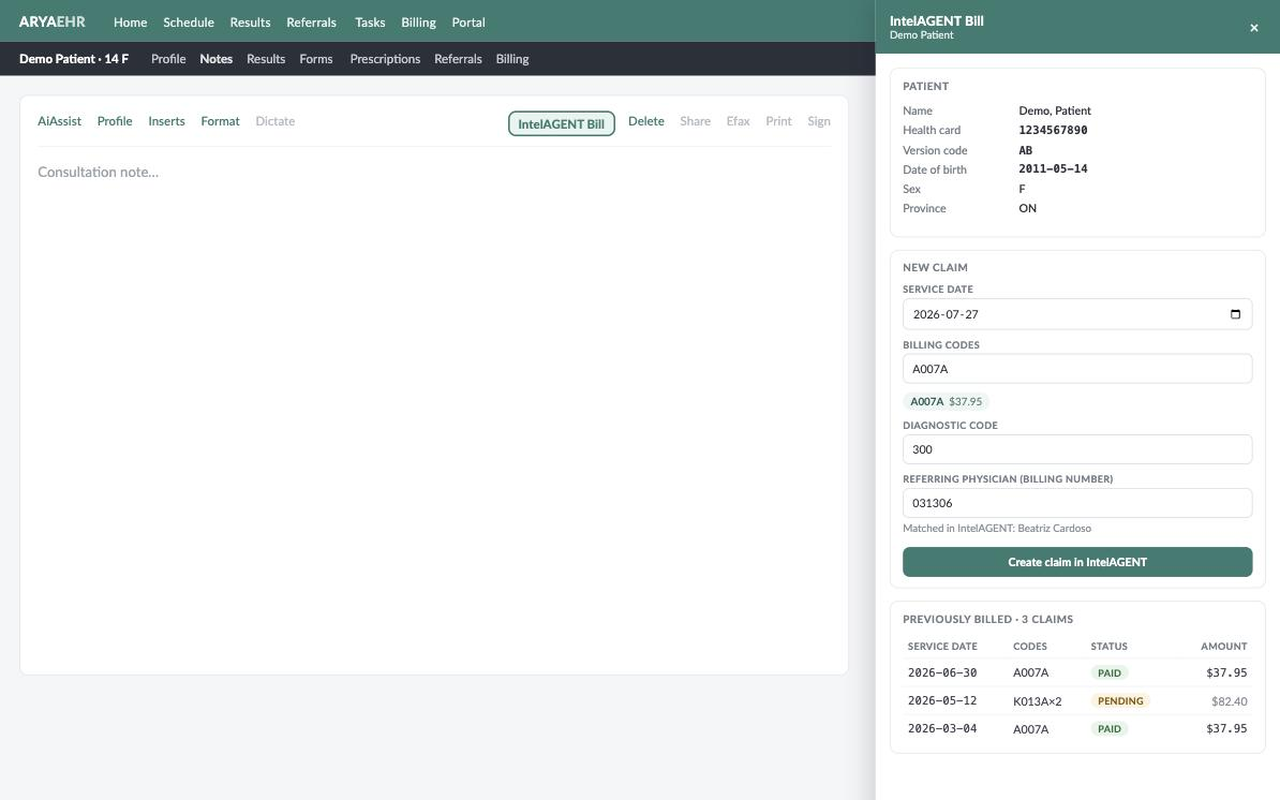
An IntelAGENT Bill button sits in the note toolbar beside Sign and Print. Click it and the patient is already filled in.
Health card, version code, DOB and address pulled from Arya
Billing-code and referring-physician lookup as you type
Every prior claim and its payment status on the chart
Claims land in IntelAGENT and go to the Ministry on the usual schedule
Referral analytics
See who actually refers to your clinic
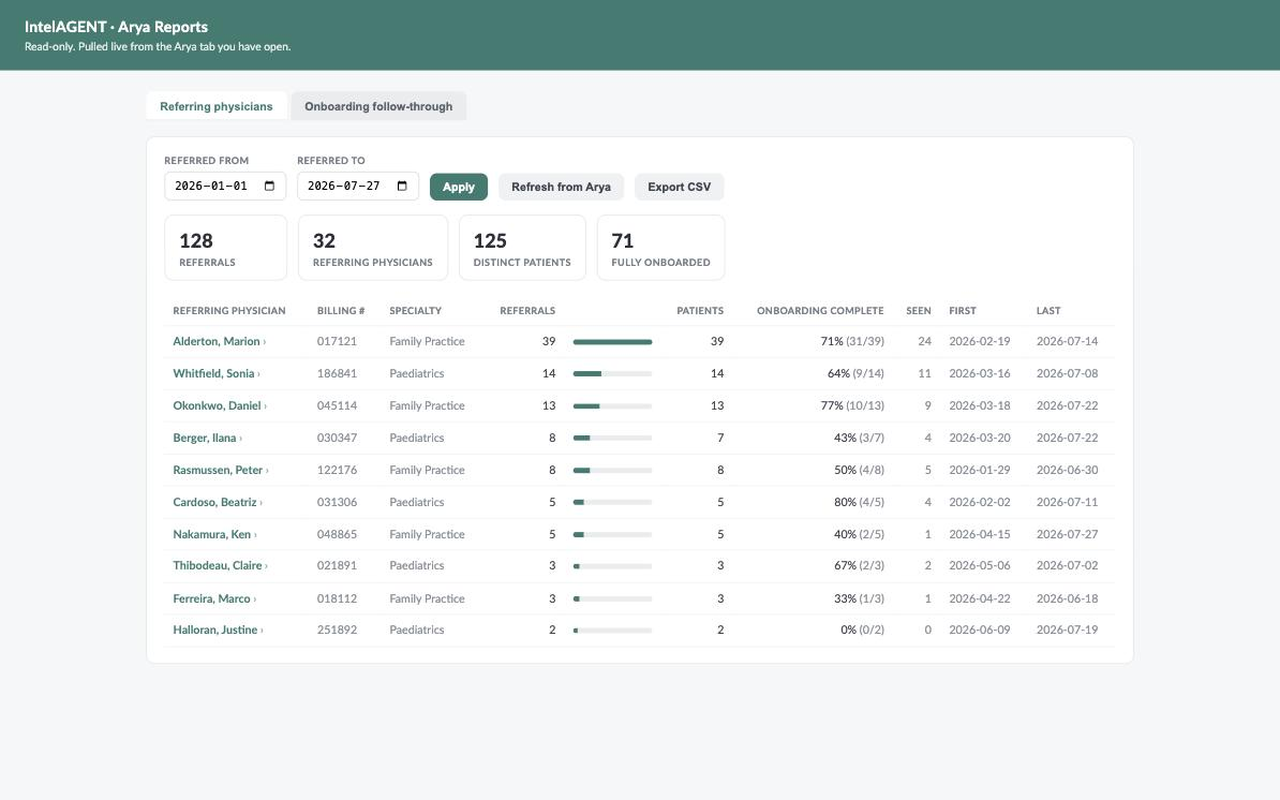
The extension adds an IntelAGENT Analytics item to Arya's account menu, built from your own referral and intake data.
Referral volume per referring physician, with date filters
Onboarding follow-through — which patients never finished intake
Sortable tables with one-click CSV export
Runs live against your open Arya session — nothing to sync or import
Read-only against Arya
The extension never writes to your EHR — it reads the chart and writes only to IntelAGENT. It
uses your existing Arya session, so no Arya credentials are stored, and opening the billing panel
does not add a chart-access entry. Patient data stays between your browser and IntelAGENT's
Canadian servers. Read the privacy policy.
How does billing work for a clinic with several providers?
The clinic gets one account with every provider on it. Claims are still submitted under each physician's own OHIP billing number, but the clinic sees all of them on one dashboard, with one place to look for what's outstanding. Front-desk staff and managers get their own logins with the access you decide.
How is clinic billing priced?
Clinics are quoted a flat monthly rate per physician rather than a percentage, so the cost is predictable as the clinic grows. Tell us how many providers you have and we'll quote it.
Can we see each provider's billing separately?
Yes. Every claim, payment and rejection is attributed to the physician it belongs to, and the reports break revenue, rejections and outstanding claims down per provider as well as for the clinic as a whole.
Which EMRs do you work with?
We read exports from Epic, Cerner and any EMR that can produce a report — send us a sample and we'll map it to a reusable template. There's also an API, and a free Chrome extension for Arya EHR that puts billing directly in the chart.
Can you take over from our current billing provider?
Yes. Changing the MC EDT designation moves future submissions to us. Claims your previous provider already submitted keep settling to the same account, and we reconcile those remittances alongside the new ones, so nothing is stranded in the handover. Tell us what's still outstanding and we'll track it with you.
How long does it take to get a clinic set up?
The gating step is the MC EDT designation at the Ministry, not our setup — allow a few business days for it to take effect. We build the clinic, its providers, facilities and EMR mapping while you wait, so the first submission goes out as soon as the designation is live.
Does every physician in the clinic need their own MC EDT account?
Each physician designates IntelAGENT to submit on their behalf, and their billing number and GO Secure account stay theirs. A group billing under a shared group number is set up differently — see departments and groups for that arrangement.
Who handles a rejected claim?
We do. Refused and reduced items are investigated, corrected, resubmitted and tracked until they settle, and appeals are filed where the Ministry got it wrong. Nobody at the clinic has to notice the rejection first.
Get Started
Find out what your clinic is missing
Tell us how many providers you have and which EMR you run, and we'll show you what a managed billing arrangement would look like.